Writer's Block Is a Process Defect or How to Improve Task Switching Without Dremeling Holes in Your Skull
Table of Contents
1. Writer's Block Is a Process Defect or How to Improve Task Switching Without Dremeling Holes in Your Skull
Hi, there!
Self-editing scene 24 of my novel drove me mad. I couldn't bring myself to do this work for weeks even though it was easy. Eventually I found a cheap and simple solution. If doing lots of small tasks and/or switching between them is hard for you, this article may be worth reading.
1.1. The Symptoms
1.1.1. The Self-Editing Process
I have a first shitty draft of my novel. It consists of several scenes and each scene corresponds to one or more chapters.
I self-edit in two phases:
- Structural work
- Fine polishing
In scope of structural work I rewrite the chapters from scratch if the old version is hopelessly bad. In this phase I focus on getting the structural elements of the scene right, e. g. make the conflict stronger or convey the meaning of the scene better.
Then, after the chapters are good enough structurally I fix issues such as
- grammar errors,
- grammatically valid expressions which don't sound natural to Americans,
- word repetitions,
- redundant explanations (removing signs that say 'tree' from trees in Yurii Nikitins's terminology, or RUE in that of Browne and King),
- missing footnotes for words the target audience may not know.
1.1.2. The Fine Polishing Process
Most of the time I do this work as shown in the diagram below.
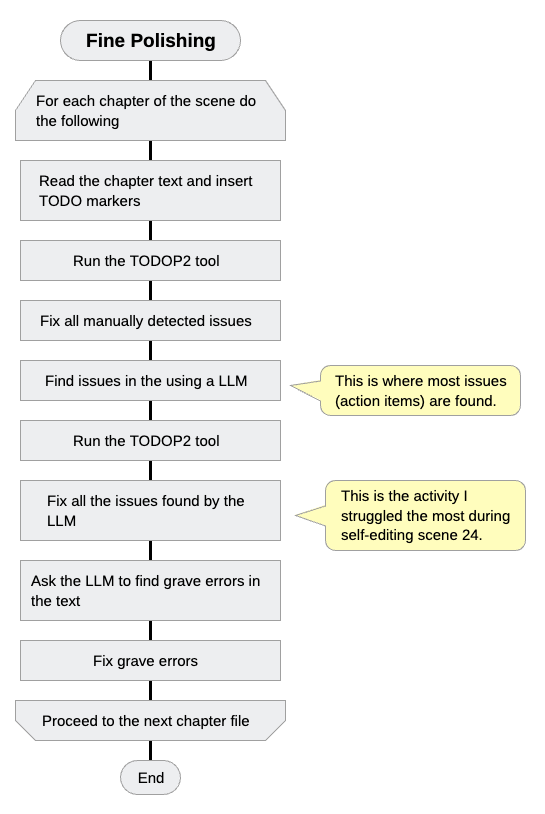
Figure 1: The fine polishing process
First, I read the text of the respective chapter and add TODO markers for every issue I find.
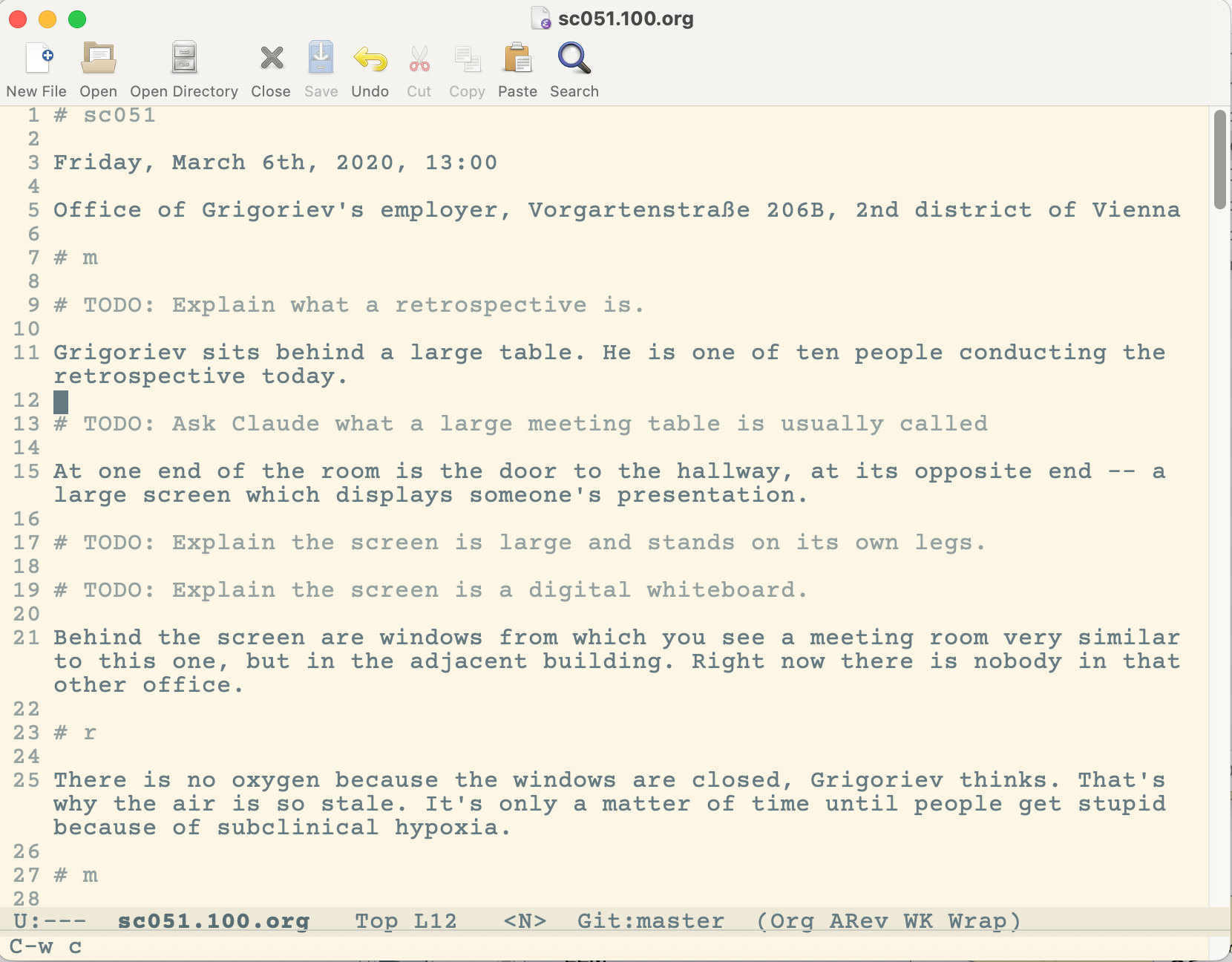
Figure 2: TODO markers in a chapter file
Then I run a tool todop2 (TODO processor version 2) against the chapter and protocol files. For every TODO item in the chapter it creates an action item in the protocol file. Every such action item has a link and if you click on it you get to the location in the chapter file where the problem occurred.
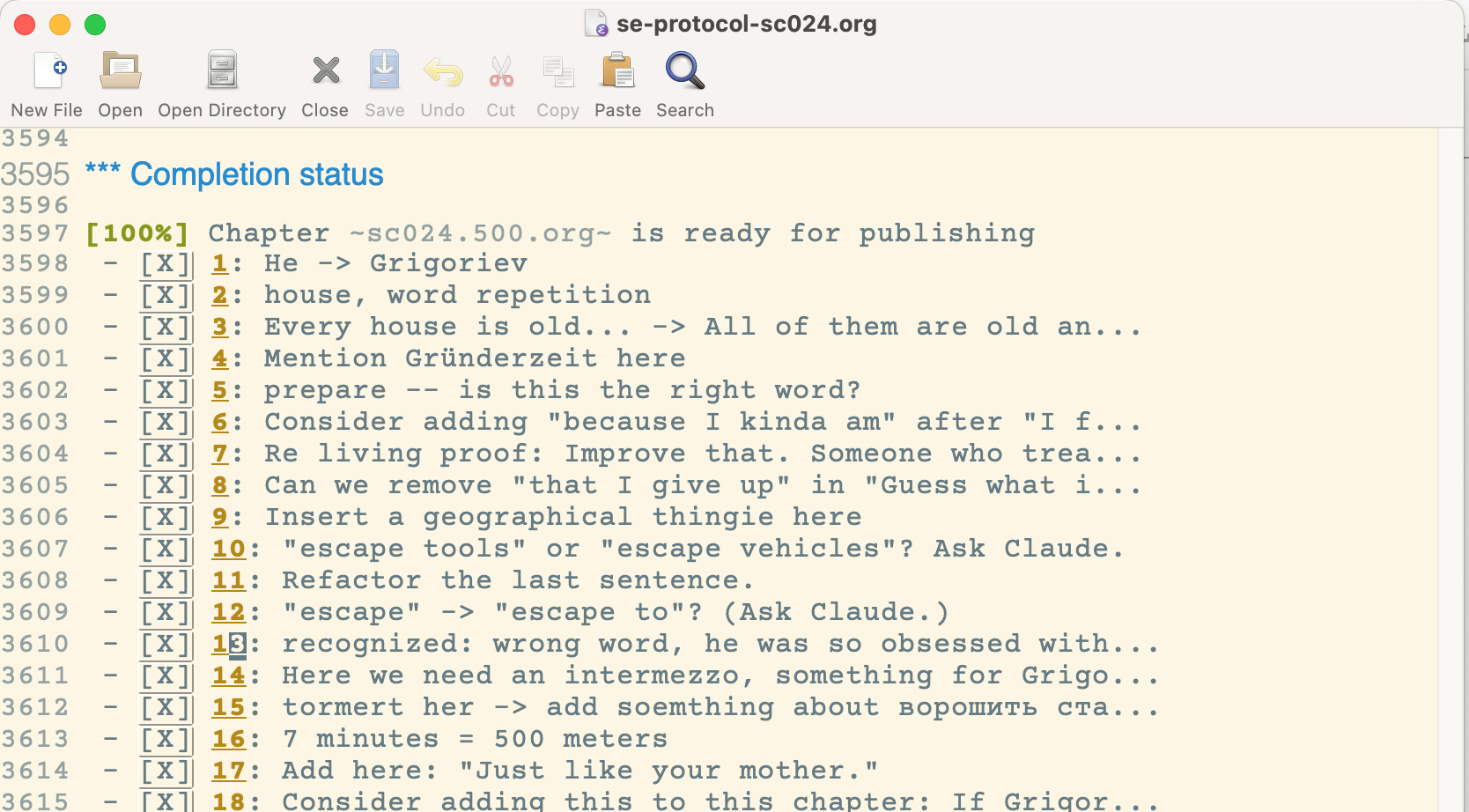
Figure 3: Section of the protocol with a list of action items inserted by the todop2 tool
Then I fix every manually detected issue.
1.1.3. Instructions for a LLM to detect issues in a chapter file
Thereafter I ask a large language model (Claude) to find problems in my chapter file. There is a feature "Projects" which allows you to give the LLM instructions for recurring tasks.
At the moment I have the following instructions for Claude:
I want you to take on the role of a copy-editor.
Most chats in this project will proceed as follows.

1. First I give you the name of the Org mode file in my filesystem which you are supposed to copy-edit.

2. You respond whether or not you can read this file.

3. Then you find all

3.1. typos,
3.2. orthographical,
3.3. stylistical errors,
3.4. artifacts like "uhm",
3.5. expressions which are grammatically correct, but sound unnatural to the American target audience

in this text.

4. For every found improvement suggestion, add a line in the format

`# TODO: <Text>`

where `<Text>` is your improvement suggestion.

5. Write the result to the same file.
Here are some requirements for text in my novel:

1. The language is American English.
2. The target audience are non-hispanic White Conservative American males, ages 35-45, with a high school or bachelor education.
3. Slang is welcome.
4. Most of the time I use the present tense to describe what happens "on screen", i. e. "right now."
5. Tenses other than present may be used in memories and thoughts of characters.
6. Do not try to avoid repetition of expressions "he says" and "she says". These two expressions are like punctuation marks.
7. Use simple language, style of Ernest Hemingway or Charles Bukowski.
8. Avoid gerunds (-ing form) where possible.
9. Avoid adverbs where possible.
Punctuation (e. g. missing or displaced commas) also count as errors and should be reported as any other mistake.
Do not change the text itself. Only add information what I have to change in the `# TODO: ...` statement. I will change the text myself.
Detect and mark word and phrase repetitions.

Figure 4: Project instructions in Claude desktop application
Inside that project, I run a prompt
Please proofread the file `/Users/pravles/dev/focus/legacy/wn/src/txt/chXYZ.org`.
where chXYZ.org is the name of the chapter file I am currently editing.
If everything works well, Claude will insert TODO markers into the chapter file.
Then I run the todop2 tool again which inserts links to individual issues into the protocol file.
Then I process every issue one by one.
It is here that the task switching problem occurs. In one of the chapters of scene 24 there were 77 action items and most of them were added by Claude.
When these issues are fixed, I ask Claude to find grave errors outside of the self-editing project. I use the following prompt for this:
Please find grave grammatical errors in file `/Users/pravles/dev/focus/legacy/wn/src/txt/chXYZ.org` and report them in this chat.
This time I fix the issues without running the todop2 tool.
Once Claude says there are no grave errors in the chapter file, I consider it self-edited.
1.2. The Problem
Now let's look at the symptoms from two different perspectives.
1.2.1. Perspective 1: Modes of the Mind
Earlier I wrote that writing forces you to understand how the psyche works better. There are the following three modes in which the psyche can operate which are relevant for self-editing:
- The linear mode
- The non-linear (Vygotskian) mode
- The undefined mode
1.2.2. The linear mode
In linear mode, the more time you invest into an activity and the more focused you are, the faster the goal of the activity will be accomplished.
These are tasks which are either easy to do, or complex ones which consist of many easy steps. If you can do something on autopilot in good-enough quality, you probably are using your brain in the linear mode.
Fixing issues in a chapter file detected by Claude (without structural changes) falls into this category, as well as brushing your teeth, doing dishes, buying groceries.
Distractions are bad in this mode. If you go to a supermarket to buy bread, ham, and cheese, then get distracted and sit in a café for half an hour, this will only delay the time when your goal is attained. More time and more focus mean faster completion of an activity.
1.2.3. The non-linear (Vygotskian) mode
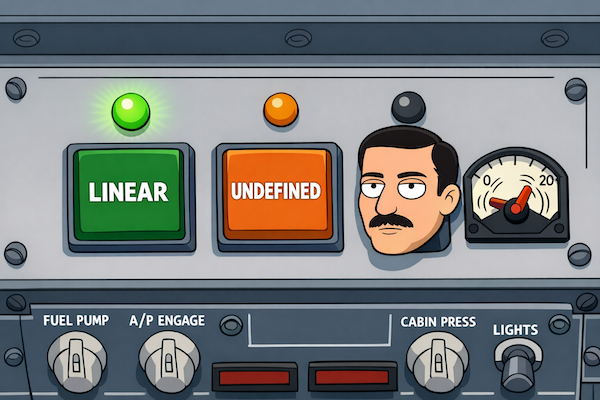
Figure 5: Transition into the Vygotskian mode can take more time than for entering the linear or undefined one
In the non-linear mode, the latter condition doesn't hold. If you are working on a problem for which no established method exists and/or the problem itself isn't well defined, the following procedure can work:
- You research whatever you can.
- You attempt to solve the problem to the best of the abilities of your rational mind.
- Then you hand off the work to the intuitive mind, also known as the Default Mode Network.
Russian psychologist Lev Semyonovich Vygotsky created a beautiful metaphor on how this part of the mind works:
Clouds of thought, driven by the winds of motive, pour down in a rain of words.
You cannot control the weather directly, as you can't directly control the processes which turn a seed into an ear of grain. Pregnant women can't directly control which hormone is injected into their bloodstream, or what nutrients are being directed to the embryo.
But you can spray chemicals into a cloud to trigger rainfall, put fertilizer in the soil, and put the pregnant woman into a place where she is listening to classical music, eating the right kind of food, and is protected from stress to the highest possible degree.
When I
- think how to convey the message of the novel through events,
- try to create memorable endings for chapters, or
- realize a piece of text is garbage and try to make it less garbagey,
I am working in the Vygotskian mode.
It is non-linear because if, in the middle of the activity you go for a walk, sit in front of a fountain for half an hour, or chat with a waitress, it can help you achieve your goal faster. "Useless" activities like these give the default mode network the time and space to do its work.
It is not limited to writing. In my day job there is an old, complex software system. I was responsible for an upgrade which lasted for almost a year, affected virtually every part of that system, and when the modified version was deployed in production there were no incidents. This was an exceptionally good outcome.
A year before, when I volunteered to do this upgrade I looked at the values of the team and realized this: If I want this upgrade to go smoother than usual, I need to
- work according to values diametrically different to those prevalent in the team
- without receiving too much resistance.
Most of the things I did while implementing the upgrade were informed by these considerations.
In order to think and act along these lines, to outsmart the team for its own benefit (major upgrade without sleepless nights and emergencies) you need to detect the true values of the team and their consequences from e-mails and voice communication (this is a 100% remote job, I never saw my colleagues face-to-face, and videoconferences are all conducted in voice-only manner). All of this sometimes requires thinking in the Vygotskian mode.
The harder the problem, the more likely you are to work in the Vygotskian mode in one of its phases.
1.2.4. The undefined mode
The undefined mode includes all activities which aren't as routine as those in the linear mode, but less complex than those in the Vygotsky mode.
1.2.5. Why knowing the modes is useful
Low writing productivity can occur in all three modes. It is helpful to know what mode we are aiming at.
For example, I am unlikely to enter the Vygotsky mode if I'm under stress (perceive real or imagined danger), haven't had enough sleep, or haven't walked myself enough.
In my struggles with scene 24 there was no need for complex work. That work has been done already. What I had to do is to fix typos, stylistical and grammatical errors, and expressions that sound weird to Americans.
This is a clear case for the linear mode.
1.2.6. Conclusion
When the problem with fine polishing of my chapters occurred, I excluded all obvious external causes. I slept enough, there were no external distractions, and on some days I had no other appointments other than writing.
Since I could not do the fine polishing work even under these near-ideal conditions, the problem must be within my psyche.
1.2.7. Perspective 2: AuDHD
Then I stumbled across the book AuDHD: Blooming Differently by Leanne Maskell. Among other things she claims that people with AuDHD
- have issues switching between tasks and
- perceive time differently from normies.
Neurotypical people imagine time flowing from the past through present into the future.
For AuDHDers only two times exist:
- Now
- Not now
This raises the question: Could it be that task switching is hard because
a) sometimes I get lost in my thoughts and forget how long I've been trying to accomplish one little thing (i. e. spent way more time than necessary on a little thing because I lose track of time), and
b) a new task shifts from "not now" into "now" not fast enough?
1.3. Possible Solution
If true, the solution would be obvious: Create a little program which
- would display the time I've been working on the current small task,
- would always be visible, and
- make me aware of the passage of time.
Note: This only applies to linear mode. In the Vygotskian mode it could make sense to focus on the problem so deeply you forget time.
The initial sketch of the user interface looked like shown below.

The actual application looks like this:
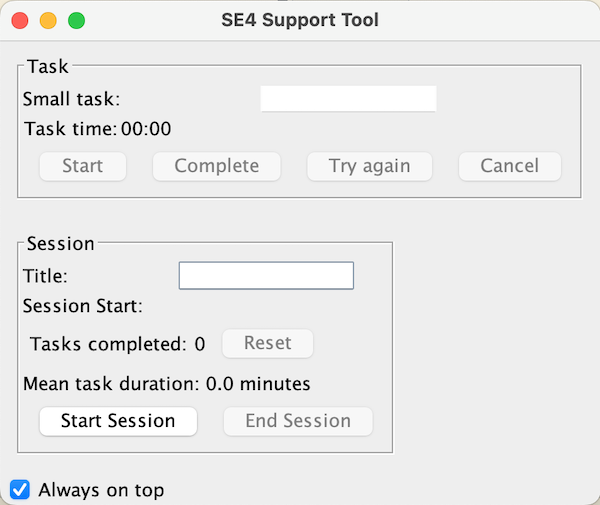
It's supposed to work like this: I launch the application and press the Start Session button.
Then I type the name of the next small task into the Small task text field and press the Start button. The timer marked with Task time starts to run.
When the task is completed, I press the Complete button. The timer stops and the text field is cleared.
When I get distracted, I press the Try again button and the time counter resets.
1.4. Does it work?
The first time I used this tool was on January 26, 2026. I completed 6 fine polishing tasks within 51 minutes.
Beating the clock was uncomfortable (stress-inducing), but probably useful.
I also discovered that during this particular session the average task took 5 minutes and a trivial task such as inserting a footnote – a whopping 10 minutes.
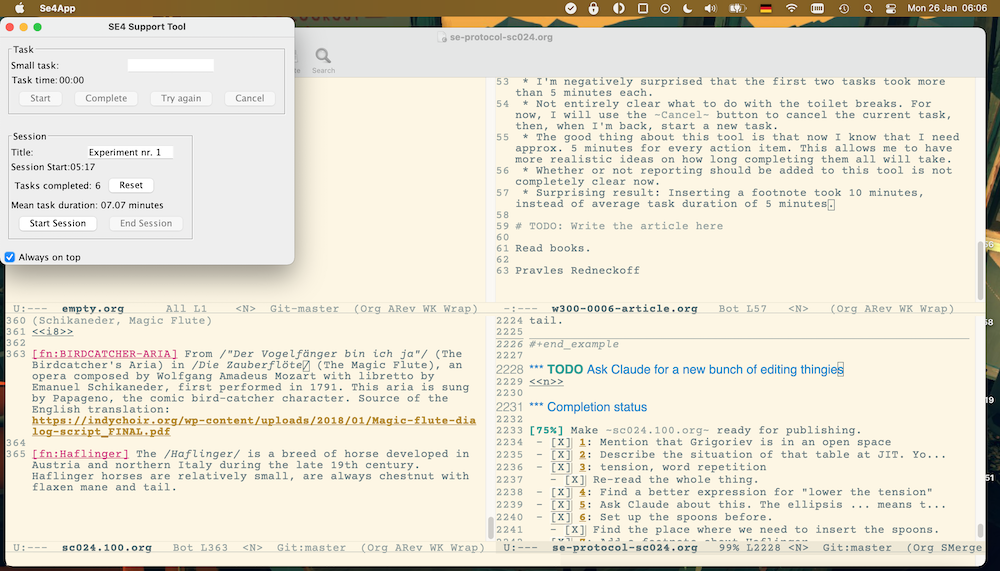
In one of the subsequent sessions I discovered that I can work faster, if I fix 3 issues in one go (enter three issues into the text box and push the Complete button after all three were fixed). This seems to be more efficient and convenient than entering a new task for each of the many issues.
After I started to use the SE4 tool on a regular basis, task switching ceased to be my primary type of writer's block. The new biggest problem became my psyche's response to traumatic material. I will explain how I dealt with this issue in one of the subsequent posts.
1.4.1. Experiment with the tool outside of fine polishing
I have a speech impediment and in order to keep the speech apparatus working I have to do the following 17 exercises every day inspired by the technique from the King's Speech movie.
- Relax the jaw muscles by moving the head from side to side, up and down (1 minute).
- Lightly bounce on both feet, wave your arms like waves, arms loose and floppy like ropes (1 minute).
- Relax the shoulders by moving only them (1 minute).
- While lying down, relax, place your hands on the lower chest (where the ribs begin) and breathe deeply with your belly (diaphragm, 2.5 minutes).
- While lying down, relax, place your hands on your lower chest, put a belt around your belly, and breathe deeply — expanding your belly to press against the belt with each breath (2.5 minutes).
- While lying down, relax, place your hands on your lower chest, and breathe deeply with your belly — with two weight plates (7.5 kg total) resting on your abdomen (2.5 minutes).
- Simply recite tongue twisters (5 minutes).
- Recite tongue twisters at three different speeds (5 minutes).
- Recite tongue twisters while emphasizing a gesture and a stressed word — first stressing the first word, then the second, and so on. While doing so, bounce a ball off the floor or wall (5 minutes).
- Sound drill using consonant clusters (e.g. 'zdust, strust, stu, zdu…'), cycling through all five vowels (у, о, а, э, ы). Move your arms at waist level while speaking, and bounce a ball off the floor.
- Swing both arms alternately left and right while squatting, reciting a different tongue twister each time.
- Roll curled up in a ball on the floor while reciting either a tongue twister or an improvised speech (2 minutes).
- For every Russian consonant except Б (B), Г (G), Д (D), К (K), П (P), and Т (T): pick a word starting with that consonant and say it twice — first stretching the opening consonant sound out as long as possible, then saying the word normally.
- The "machine gun" exercise on consonants like Т (T), Д (D), Г (G), and so on. Speak while smoothly moving your hand through the air.
- Squats — as you rise from each squat, say a vowel sound, a tongue twister, or a few improvised sentences (1 minute).
- Record yourself reading a book aloud while loud music plays in the background, then listen to the recording (2.5 minutes).
- Improvised speech recorded on a voice recorder. Try to speak about something more engaging or contentious than simple noun associations — politics, for example (2.5 minutes).
Every individual exercise is easy and boring. By now, I know the sheet with the tongue twisters by heart. Doing these exercises may improve my speech, provided that I do them every day. The less I get distracted, the faster I will be done with them. These exercises are a perfect example for a task where the psyche should be used in the linear mode.
I've been doing these exercises since the first quarter of 2024 and I have data on their duration since June 2024.
According to those data, the minimal duration for all these exercises is 53 minutes, the average one – 67 minutes, and the maximum one – 232 minutes.
Below you can find a diagram which shows durations of the exercises on a particular day (blue line) and the weekly average (red line).
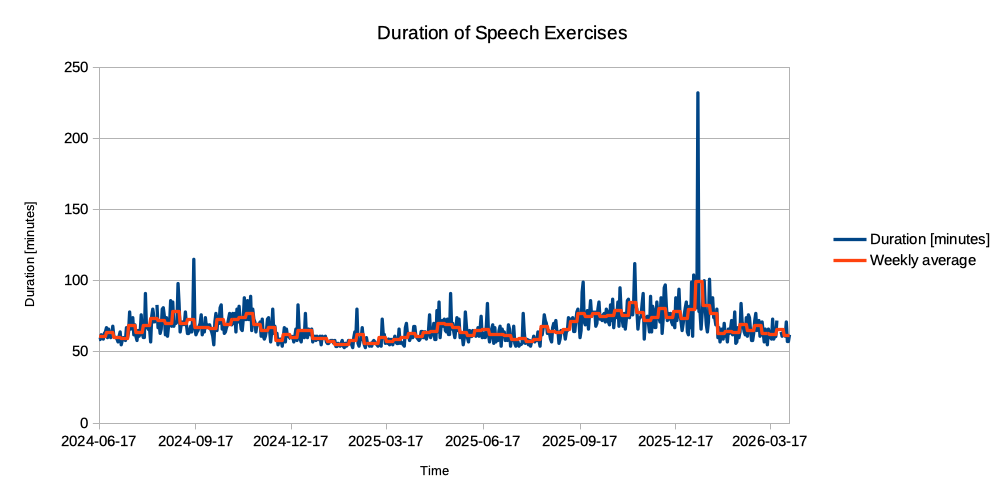
Figure 6: Duration of the speech exercises
I started to use the tool described here on January 26th, 2026. We can now separate the durations in two groups:
- Before introduction of the tool (2024-06-17 through 2026-01-25).
- After introduction of the tool (2026-01-26 through 2026-04-04).
If the tool actually helps me do these exercises faster (improves task switching), this should be visible in the data.
Here are some statistics:
- Count: 588 before the introduction of the tool, 69 after
- Mean duration: 67.44 (before) vs. 64.66 (after)
- Median duration: 65 (before) vs. 63 (after)
- Standard deviation: 12.64 vs. 12.45
According to the Mann-Whitney U test the difference between durations before and after introduction of the tool is not statistically significant.
Subjectively, I do feel that this tool makes me complete more things than before. It could also be that in this experiment the changes aren't statistically significant because there is not enough data on durations with the tool (only 69 data items with the tool compare to 588 without).
If you want to give this tool a try, you can find its code here.
Read books.
Pravles Redneckoff